

Introduction :
Every smart machine around you — from your mobile phone to your microwave — runs because of something special inside it: an embedded system.
But have you ever wondered what makes an embedded system work? 🤔
Just like our body has a heart, brain, and nerves, an embedded system also has important parts that help it sense, think, and act.
In this post, we will explore the main components of an embedded system and understand how they work together to make machines come alive!
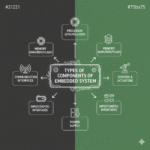
1. Hardware Components
The hardware is the body of the embedded system.
It includes all the physical parts that make the system run.
Let’s look at the main hardware pieces one by one.
a) Microcontroller or Microprocessor
This is the brain of the embedded system.
It performs all the calculations, makes decisions, and controls other parts.
- A microcontroller has memory, input/output ports, and a processor — all inside one chip.
- A microprocessor is used for bigger systems that need more power and speed.
Example:
In a washing machine, the microcontroller decides when to start or stop the motor and how long to wash the clothes.
b) Memory
Memory is like the brain’s notebook.
It stores data, instructions, and results.
There are two main types:
- ROM (Read Only Memory): Stores the program permanently.
- RAM (Random Access Memory): Stores temporary data while the system runs.
Example:
In a digital thermometer, memory stores temperature readings and software instructions.
c) Input Devices
These are the parts that collect data from the outside world.
They send signals to the microcontroller to take action.
Examples:
- Buttons and switches
- Sensors (like temperature or light sensors)
- Keypads
Example:
In an air conditioner, a temperature sensor tells the system how hot or cold the room is.
d) Output Devices
After processing the input, the system sends out signals to output devices to perform an action.
Examples:
- LEDs or display screens
- Motors
- Speakers
- Buzzers
Example:
When you press “Start” on a microwave, the output motor begins to rotate the food plate.
e) Power Supply
Every embedded system needs power to run.
It converts electrical energy into the required voltage for the circuit.
Examples:
- Batteries
- Power adapters
- Solar cells (in portable or outdoor devices)
Example:
A smartwatch uses a small rechargeable battery as its power supply.
f) Communication Interfaces
Some embedded systems need to connect or talk with other systems.
Communication interfaces help in sending and receiving data.
Examples:
- UART (for serial communication)
- SPI and I2C (for sensor communication)
- USB, Bluetooth, or Wi-Fi
Example:
A smart home bulb connects to your phone through Wi-Fi or Bluetooth.
2. Software Components
The software is the mind of the embedded system.
It tells the hardware what to do and how to do it.
Software is written in programming languages like Embedded C, C++, or Python.
a) Application Software
This part is responsible for performing the actual job of the system.
It can be simple or complex depending on the device.
Example:
- In a calculator, the software handles addition and subtraction.
- In a robot, it controls movement and sensor readings.
b) Operating System (if used)
Large or smart systems use an Operating System (OS) to manage multiple tasks at the same time.
For real-time devices, a Real-Time Operating System (RTOS) is used.
Example:
- Smart TVs or smartphones use operating systems to manage apps and user input.
3. Firmware
Firmware is the heart of the embedded system.
It is a special type of software that is stored permanently inside the memory (usually in ROM).
It stays there even when the power is turned off.
Firmware acts as a bridge between the hardware and the software — helping them work together smoothly.
Example:
When you turn on your washing machine, the firmware runs first and tells the system how to start each washing cycle.
4. Sensors and Actuators
Some embedded systems also include sensors and actuators to interact with the environment.
Sensors
Sensors detect changes like temperature, light, or motion and send signals to the microcontroller.
Examples:
- Temperature sensor in air conditioner
- Motion sensor in automatic doors
Actuators
Actuators act or move based on the signals received from the system.
Examples:
- Motor that opens or closes a valve
- Servo motor that moves a robot arm
How the Components Work Together
All these parts — hardware, software, and firmware — work together like a team.
Let’s take an example: automatic street lights 🌃
- Sensor detects the darkness.
- Microcontroller receives this signal.
- Software decides to turn the lights ON.
- Actuator (light switch) turns the lamp on.
- Firmware ensures the same process happens daily at the right time.
Simple, right? That’s how every embedded system works — by sensing, deciding, and acting!
Quick Summary Table
| Component | Role | Example |
|---|---|---|
| Microcontroller | Brain of the system | Washing machine control |
| Memory | Stores program/data | Calculator memory |
| Input Device | Sends data to system | Temperature sensor |
| Output Device | Acts on system signals | Display screen |
| Power Supply | Gives energy | Battery or adapter |
| Software | Controls operations | Application logic |
| Firmware | Connects hardware & software | Stored control code |
Future of Embedded Components
Modern embedded systems are becoming smaller, faster, and smarter every year.
We now have:
- AI-enabled chips that can learn from data.
- IoT sensors that connect homes and industries.
- Energy-saving microcontrollers for longer battery life.
These advanced components are shaping the future of technology — from self-driving cars to smart cities.
Conclusion
An embedded system may look small, but it’s made up of powerful parts that work together like a living body.
- The hardware gives it strength.
- The software gives it purpose.
- The firmware keeps it alive.
When combined, these components make everything around us — from phones to airplanes — smart, safe, and efficient.
-Vintech Embedded Academy Blog Post

Assisted me a lot, just what I was looking for : D.
Appreciate it for helping out, good info .
Wonderful work! This is the type of information that should be shared around the net. Shame on Google for not positioning this post higher! Come on over and visit my website . Thanks =)
Good information